

Lithium Battery Disposal Guide (2026): What Homeowners Should Do (and What We See on Cleanouts All the Time)
Last updated: March 1, 2026
Lithium batteries aren’t “rare hazardous waste” anymore. They’re in normal life.
Phones. Laptops. Vapes. Power tools. Earbuds. Cordless vacuums. Scooters and e-bikes. Toys. Cameras. Smart home devices. Power banks. That little gadget you bought once and forgot about.
And the reason batteries have become such a big deal isn’t because homeowners are careless.
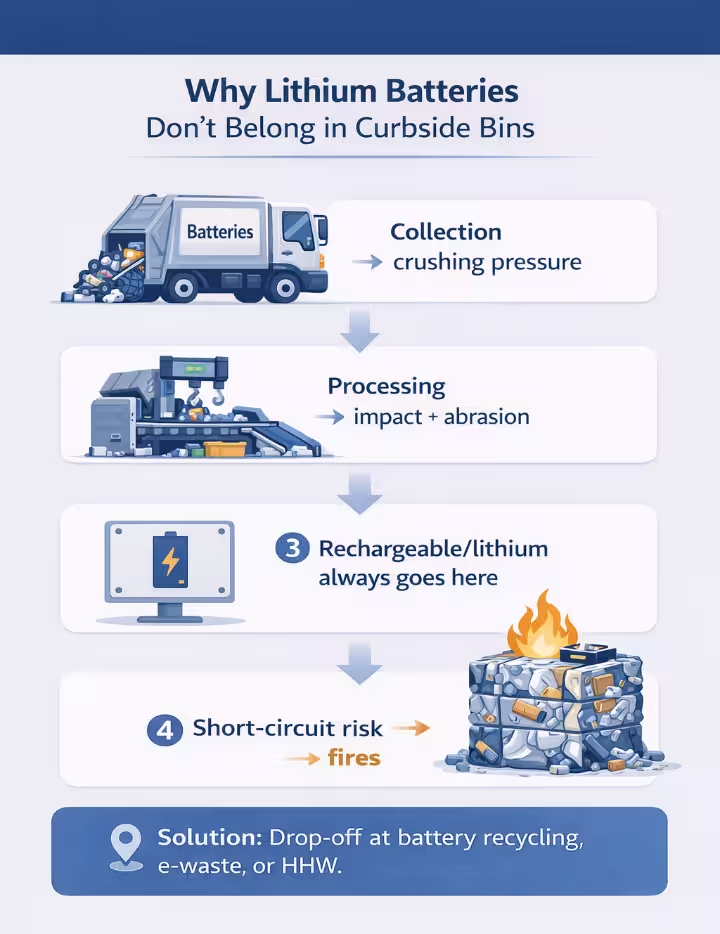
It’s because modern trash and recycling systems are full of steps that crush, compress, puncture, and grind materials. Lithium batteries don’t tolerate that. When they short-circuit or get damaged, they can ignite surrounding paper, plastic, and debris.
EPA documented 245 fires (2013–2020) at 64 waste facilities that were caused by, or likely caused by, lithium metal or lithium-ion batteries — and notes that incidents are likely underreported.
So this guide is built to be a practical reference you can actually use:
- when you’re cleaning out a garage
- when you’re moving
- when you’re handling an estate cleanout
- when you find a swollen laptop battery and don’t know what to do
- when you have a pile of vapes and tool batteries and just want them gone safely
We run cleanouts and junk removal work, so we see the same battery mistakes on repeat: loose batteries tossed into bags, vapes thrown into trash, tool batteries rolling around under metal junk, and “dead” power banks left in hot garages for months.
This post is the system we wish every household used.
What you’ll learn
- The 10-second disposal rule that prevents most mistakes
- A quick chooser that tells you what to do with any battery type
- How to prep batteries safely (tape + isolate)
- What to do with swollen, leaking, wet, or damaged lithium batteries
- Where to recycle batteries nationwide without guessing
- A device-by-device cheat sheet (vapes, tools, laptops, e-bikes, toys, vacuums, power banks)
- A “local rules in 60 seconds” method
- What we commonly see on cleanouts and how to avoid the same issues
The 10-second reality check
If it’s rechargeable or lithium, do not put it in your household trash or curbside recycling bin.
EPA’s consumer guidance is clear that lithium-ion batteries and devices containing them shouldn’t go in household garbage or recycling bins because they can cause fires, and they recommend steps like taping terminals and bagging batteries for safer handling on the way to a proper drop-off.
If a battery is swollen, leaking, hot, punctured, crushed, water-damaged, or recalled, treat it as special-handling (higher risk). PHMSA specifically addresses damaged/defective/recalled (DDR) lithium batteries as higher risk.
Quick chooser: what should you do with this battery?
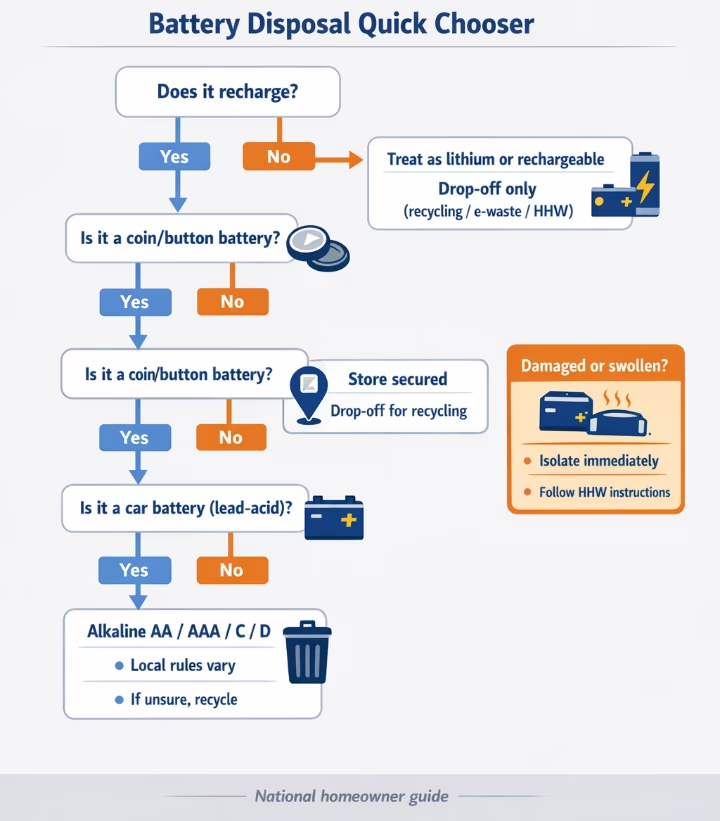
Step 1: Is it rechargeable?
If it recharges, it’s usually lithium-ion (especially newer consumer devices), but some older devices use other rechargeable chemistries. Examples:
- phones, tablets, laptops
- earbuds, speakers, smartwatches
- power tools
- vapes
- cordless vacuums
- scooters/e-bikes
- power banks
Action: Drop-off only (battery recycling, e-waste recycler, or HHW). Do not trash or curbside recycle.
Step 2: Is it damaged or swollen?
If yes, it’s DDR/high risk.
Action: Isolate it and follow Household Hazardous Waste (HHW) program guidance (EPA) or manufacturer instructions. Don’t toss it into a standard retail battery box unless that program explicitly accepts damaged batteries. PHMSA warns DDR lithium batteries pose greater risk.
Step 3: Is it a button/coin battery?
These are small but serious.
Action: Store it out of reach immediately and drop off for recycling. CPSC warns button/coin batteries can cause severe internal burns quickly if swallowed.
Step 4: Is it a car battery (lead-acid)?
Heavy battery with posts, usually from vehicles or backup power.
Action: Take to an auto parts store, battery retailer, or recycler. EPA describes lead-acid battery collection/recycling as a mature system in the U.S.
Step 5: Is it a normal household alkaline AA/AAA/C/D?
EPA says in most communities alkaline and zinc-carbon batteries can go in household trash, though local rules vary and recycling is encouraged.
Action: If your area allows trash and you have no convenient recycling, trash may be permitted. If you want the safest universal approach, recycle them.
Why lithium batteries don’t belong in curbside bins
A lot of people think:
“If I recycle it, it’ll be handled carefully.”
In reality, curbside recycling and trash both involve equipment that can crush batteries:
- trucks compact loads
- conveyors move material fast
- sorting systems push, pinch, and squeeze items
- materials get baled, dropped, and transported
EPA’s lithium battery fire reporting explains that waste and recycling environments are tough on lithium batteries, and damage can lead to ignition and fires.
So the goal is simple: keep lithium batteries out of those streams.
The safe-prep method (how to handle batteries before drop-off)
This is the part that prevents the “it sparked in the bag” moments.
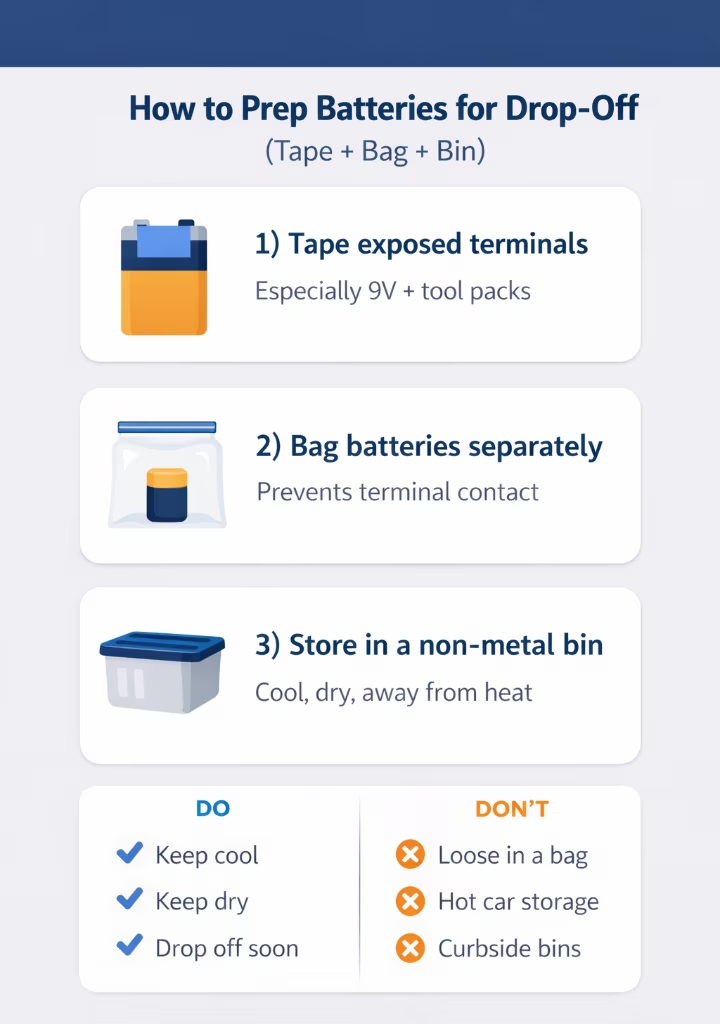
EPA recommends preventing short circuits by taping terminals and/or placing batteries in separate plastic bags before bringing them to the right drop-off.
The homeowner-safe prep checklist
- Sort into 3 piles
- Pile A: alkaline/zinc-carbon (AA/AAA/C/D)
- Pile B: lithium/rechargeable/unknown
- Pile C: damaged/swollen/leaking (DDR)
- Tape exposed terminals
Do this for:- 9V batteries (easy to short)
- tool batteries
- loose lithium cells
- anything with visible contacts
- Bag batteries individually when possible
Especially:- lithium-ion packs
- coin cells
- mixed loose batteries
- Use a non-metal container with a lid
A plastic bin is fine. The goal is preventing terminals from touching metal and preventing batteries from being crushed. - Keep them cool and dry
USFA warns against storing lithium batteries in hot cars or direct sunlight and emphasizes safe handling and charging practices. - Drop them off soon
Don’t create a “forever battery bucket.” The longer batteries sit, the more likely someone dumps them into trash during a rushed cleanup.
Common Battery Disposal Myths (and the truth)
Most battery mistakes come from myths that sound reasonable until you see what happens in the trash and recycling stream. Here are the big ones we hear (and what’s actually true).
Myth: “If it’s dead, it’s safe.”
A “dead” lithium battery can still short-circuit if the terminals touch metal or if the battery gets crushed. The risk isn’t the battery powering something — it’s the battery getting damaged or shorted during handling.
Myth: “If I tape it, I can put it in curbside recycling.”
Taping terminals helps prevent short circuits while you transport batteries to a proper drop-off. It does not make lithium batteries safe for curbside recycling. Curbside systems still crush and compact material, and lithium batteries can ignite when damaged.
Myth: “Small batteries don’t matter.”
Small lithium items (like vapes, earbuds, keychain power banks) still contain lithium cells. They get tossed because they look harmless, but they’re exactly the kind of thing that gets crushed and starts fires.
Myth: “All batteries are handled the same.”
They’re not. Lithium/rechargeable batteries are the fire-risk category. Alkaline batteries are different and may be allowed in trash in many communities. If you’re unsure what you’re holding, treat it like lithium until proven otherwise.
Myth: “I have to remove every battery from every device.”
Not always. If the battery is easy and safe to remove (like many tool batteries), remove it and recycle it. But if it’s embedded (earbuds, many vacuums, most vapes), don’t pry it open. Bring the whole device to an electronics recycler or HHW program.
Damaged, swollen, wet, or recalled batteries (DDR): what to do
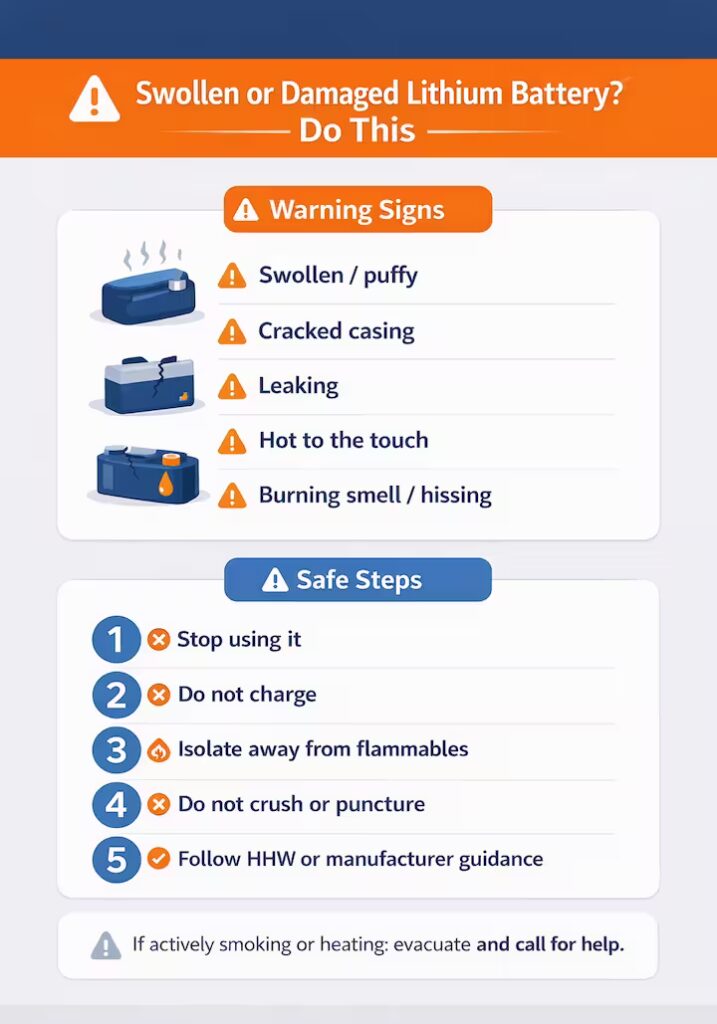
PHMSA guidance on damaged/defective/recalled lithium batteries is clear: these batteries are higher risk and can be more likely to go into thermal runaway, especially if mishandled.
What counts as “DDR” at home
- Swollen/puffy battery (common in laptops and power banks)
- Cracked casing
- Punctured cell
- Leaking fluid
- Battery that got very hot
- Burning smell or hissing
- Water-damaged pack
- Recalled battery/device
What to do (simple, safe steps)
- Stop using it
- Do not charge it
- Isolate it away from flammables (paper, cardboard, furniture, clothing)
- Do not crush it or tape it tightly (you’re trying to avoid pressure)
- Contact HHW or the device manufacturer for disposal instructions
If a battery is actively smoking, hissing, or heating up fast, treat it as an emergency. Get people away and call for help.
Button and coin batteries: the child-safety emergency angle
Coin batteries aren’t just a disposal issue. They’re a serious ingestion hazard.
CPSC warns that if swallowed, a button/coin battery can cause severe internal burns quickly and provides safety and response guidance for families.
Practical household rule
If you have coin batteries at home:
- keep them in a sealed container out of reach
- don’t leave them loose on counters
- recycle them promptly
If ingestion is suspected, contact Poison Control immediately. Poison Control’s national number is 1-800-222-1222.
Where to recycle batteries nationwide (fast, reliable options)
You don’t need a 50-state list. You need a system.
Option 1: Use a battery drop-off locator (best for normal household batteries)
Call2Recycle’s Battery Network provides a ZIP code locator for battery drop-off sites.
Option 2: Use Earth911’s recycling search
Earth911 allows searching by item/material and ZIP code and is widely used for locating recycling options.
Option 3: Household Hazardous Waste (HHW) programs (best “catch-all”)
HHW is often the best destination for:
- unknown batteries
- damaged/swollen batteries
- mixed cleanout piles
- battery-containing devices
When you call or check the website, tell them you have lithium batteries, and mention if any are swollen/damaged.
Option 4: Electronics recyclers (for devices with batteries inside)
If the battery is embedded (like many vacuums, earbuds, tablets), route the entire device through e-waste/electronics recycling channels. EPA points consumers toward proper recyclers/HHW rather than bins.
Option 5: Auto retailers for lead-acid (car batteries)
Most auto parts stores and battery retailers accept lead-acid batteries because the recycling stream is established.
Battery Drop-Off Trip Checklist (Don’t Get Turned Away)
Before you drive over, do this quick checklist. It prevents the most common problem: showing up with a bag of loose batteries and getting told “we can’t accept that.”
1) Confirm what they accept.
Some drop-off boxes only accept certain battery types. Some locations accept normal household batteries but not damaged/swollen packs. If you have anything questionable, route it through HHW.
2) Separate damaged/swollen batteries.
If a battery is swollen, leaking, cracked, hot, or water-damaged, treat it as higher risk. Don’t mix it with normal batteries and don’t assume a retail drop box will take it.
3) Tape exposed terminals.
This matters most for 9V batteries, tool batteries, and any lithium battery with exposed contacts. The goal is preventing a short if something bumps the terminals.
4) Bag loose batteries individually when possible.
Especially coin cells and small lithium batteries. Individual bagging reduces the chance of terminal-to-terminal contact.
5) Transport in a rigid container.
Use a small plastic bin or box with a lid so batteries don’t get crushed in the car or spill into a pile.
6) Don’t leave them in a hot car while you run errands.
Heat is not your friend. If you’re making multiple stops, drop batteries off first.
7) Bring devices as e-waste when the battery is embedded.
If you can’t safely remove the battery (earbuds, many vacuums, vapes), bring the whole device to an electronics recycler or HHW program instead of trying to pry it open.
Retail drop boxes vs HHW vs electronics recyclers (which should you use?)
This is the part most posts skip, and it’s where people get burned.
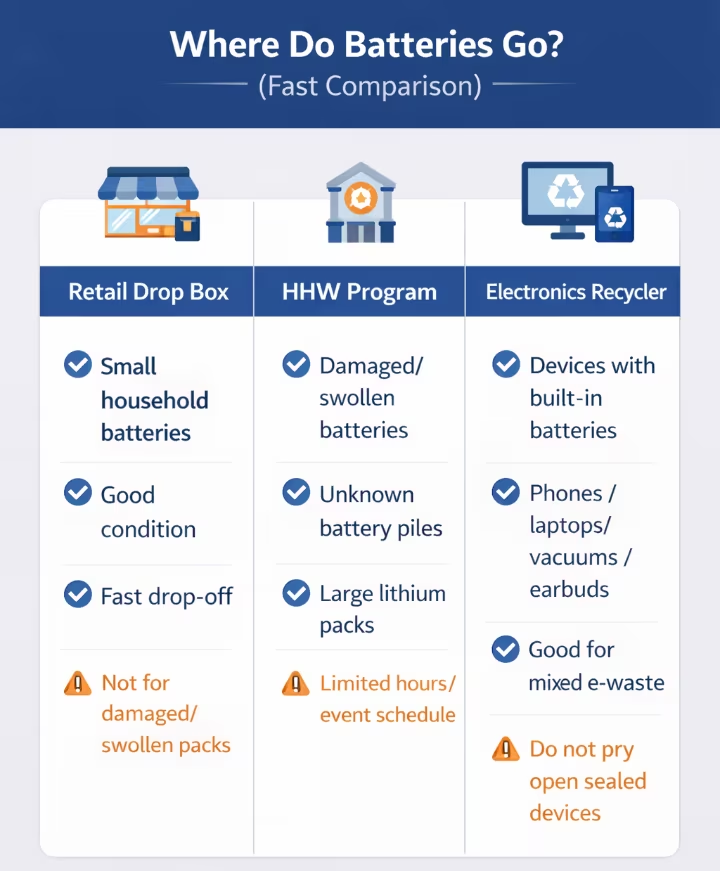
Retail drop boxes are great for:
- small household batteries in good condition (AA/AAA and small rechargeables, depending on the program)
- common consumer batteries (depending on the program)
Retail boxes are not always great for:
- damaged/swollen batteries
- large e-bike/scooter packs
- weird specialty packs
- anything leaking/hot
HHW is best for:
- damaged/swollen/leaking batteries
- unknown chemistry batteries
- large lithium packs
- mixed “cleanout” piles
Electronics recyclers are best for:
- devices with embedded batteries
- laptops, tablets, phones, speakers, vacuums
- “I don’t want to disassemble this” situations
When in doubt: HHW is the safest universal answer.
Device-by-device disposal cheat sheet (bookmark this)
Use this as a quick reference during cleanouts and declutters.
Vapes and disposable e-cigs
- Battery type: lithium-ion (embedded)
- Do: route to e-waste/HHW/battery drop-off as permitted
- Don’t: toss in trash or curbside bins
Why: small devices still contain lithium batteries that can ignite when crushed; EPA links similar items to waste stream fire incidents.
Power tool batteries (DeWalt/Milwaukee/Makita/etc.)
- Battery type: lithium-ion pack
- Do: tape terminals, store separately, drop off
- Don’t: throw loose into a tool bin or junk bag
Laptops and tablets
- Battery type: lithium-ion (often internal)
- Do: recycle as e-waste; if swollen, treat as DDR and contact HHW
- Don’t: keep a swollen laptop battery sitting around for months
Phones and smartwatches
- Battery type: lithium-ion
- Do: recycle as e-waste or approved drop-off
- Don’t: throw in trash or curbside recycling bins
Earbuds, Bluetooth speakers
- Battery type: lithium-ion (embedded)
- Do: recycle as e-waste (electronics recycler)
- Don’t: trash
Power banks and jump starters
- Battery type: lithium-ion (high energy)
- Do: keep cool, isolate, recycle
- Don’t: store in hot cars; don’t toss in trash or curbside bins
Cordless vacuums
- Battery type: lithium-ion (removable or embedded)
- Do: If removable, remove and recycle the battery. If embedded, recycle the whole device as e-waste.
- Don’t: put it in trash or curbside recycling
E-bike and scooter batteries
- Battery type: large lithium-ion pack
- Do: use HHW or manufacturer/dealer guidance; isolate if damaged
- Don’t: bring damaged packs to casual drop boxes without checking acceptance
Note: If it’s damaged, treat it as DDR and call your HHW program for instructions.
Toys, remotes, controllers
- Battery type: alkaline or coin cell (sometimes rechargeable)
- Do: remove batteries before donating; recycle coin cells
- Don’t: leave coin cells loose around kids
Note: Coin-cell safety rules apply here (keep them locked up and out of reach).
Car batteries (lead-acid)
- Battery type: lead-acid
- Do: return to auto/battery retailer or recycler
- Don’t: dump/landfill
Local rules in 60 seconds (how to check your area fast)
If you want to be perfectly compliant where you live, here’s the fastest method:
- Search: “battery disposal + your city” or “household hazardous waste + your county”
- Look for a .gov site, city/county page, or solid waste authority page
- Confirm:
- Do they accept lithium batteries?
- Do they require terminals to be taped?
- Do they accept damaged/swollen batteries?
- Are there drop-off events or permanent sites?
- If unclear, call and ask one question:
“Do you accept lithium-ion batteries, and what do you want me to do if one is swollen?”
Even EPA’s alkaline guidance is framed as “most communities” and still points people toward local solid waste rules.
What we commonly see on cleanouts (real patterns, real fixes)
These aren’t dramatic stories. They’re normal household reality.
Pattern 1: Loose 9V batteries in the same box as screws and cabinet hardware
Fix: tape the terminals on every 9V. They short easily.
Pattern 2: Tool batteries rolling around under metal scrap in a garage bin
Fix: pull tool batteries early, tape contacts, store separately.
Pattern 3: A “dead” power bank left in a hot garage or car for a year
Fix: don’t store lithium batteries in heat. USFA warns against hot environments for lithium-ion safety.
Pattern 4: Swollen laptop battery tucked into a closet because it looks sketchy
Fix: isolate it and route it through HHW or a proper e-waste recycler.
Pattern 5: Coin batteries left loose on a counter
Fix: sealed container immediately. CPSC guidance exists for a reason.
The “Battery Sweep” method for cleanouts (fast and repeatable)
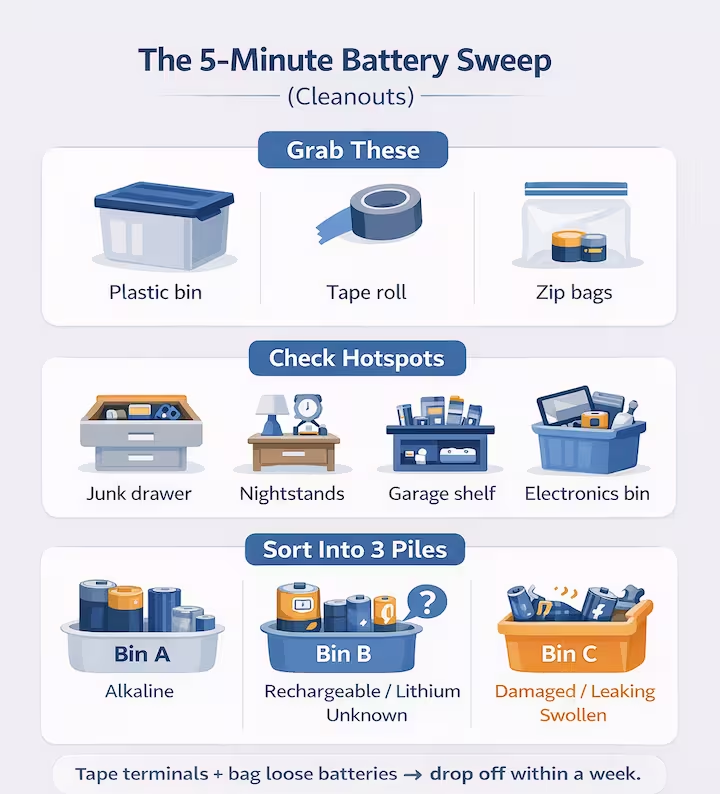
If you’re doing a cleanout, don’t wait until the end. That’s when batteries get crushed and mixed into junk.
Do this first:
- Grab:
- small plastic bin
- tape
- zip bags
- Spend 5 minutes checking battery hotspots:
- kitchen junk drawer
- nightstands
- garage tool shelf
- “old electronics” box
- kids toy bin
- vapes (drawers, cars, garage corners)
- Sort into A/B/C piles (alkaline / lithium-rechargeable / damaged)
- Tape and bag as you go
- Drop off within a week
That single habit prevents most of the “how did that end up in the trash?” outcomes.
Set Up a Home “Battery Bin” System (So This Never Builds Up Again)
Most battery disposal problems happen because people don’t have a place for batteries to go. So they end up in junk drawers, garage buckets, or random bags that eventually get tossed during a rushed cleanup.
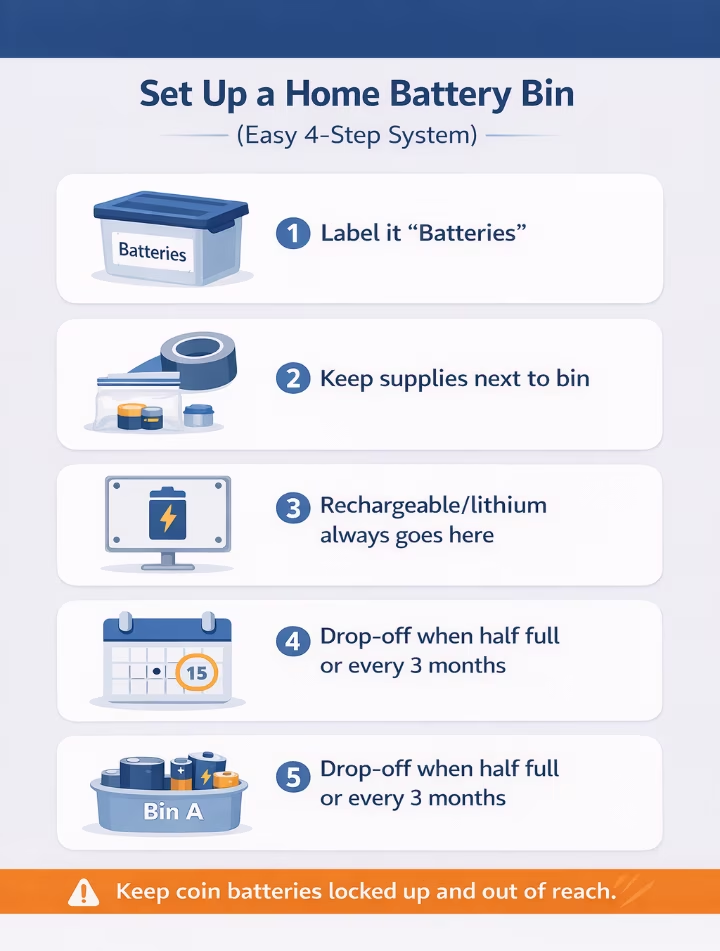
Here’s the simple system that prevents that.
Step 1: Put a small lidded bin in one spot.
A small plastic container with a lid works. Label it “Batteries for Drop-Off.”
Step 2: Keep tape and a few zip bags right next to it.
This makes the safe prep automatic. If you have to hunt for supplies, you won’t do it.
Step 3: Use one rule for your whole household:
If it’s rechargeable, lithium, or unknown → tape exposed terminals and put it in the bin.
If it’s a coin/button battery → bag it and keep it out of kids’ reach until drop-off.
Step 4: Pick a trigger so the bin never overflows.
Choose one:
- drop off when the bin is half full
- “Drop off once per quarter”
- or drop off during spring cleaning / after the holidays
Step 5: During moves and cleanouts, run a “Battery Sweep.”
Before you start throwing things into bags, check the hotspots (junk drawer, nightstands, garage tool shelf, old electronics box). Pull batteries first, prep them, and keep them separate. That one step prevents the most common “oops” moment: batteries getting crushed or tossed into trash because they were mixed into junk.
Quick FAQs
WHO WE ARE
We’re The OC Bros, and we run cleanouts and hauling jobs. That means we see the same battery mistakes over and over: loose lithium batteries tossed into bags, vapes thrown in the trash, tool packs rolling around under metal junk, and swollen laptop batteries sitting in closets for months. This guide is the process we use to keep battery items separated and handled safely — written for homeowners across the U.S. who want to dispose of batteries without guessing.
This is meant to be a bookmarkable reference: what to do with lithium batteries, what to do with damaged/swollen batteries, and how to find the right drop-off fast.
This is not legal advice or a substitute for local HHW instructions, but it will keep you on the safe side in almost every area: if it’s rechargeable or lithium, treat it as drop-off only. If it’s damaged or swollen, isolate it and follow HHW guidance.
NEXT STEP
- Do a 5-minute Battery Sweep: hit the junk drawer, nightstands, garage tool area, and any “old electronics” box.
- Tape and isolate anything rechargeable/lithium: especially tool batteries, power banks, loose cells, and 9V batteries.
- Find a drop-off near you (fast):
- Use the Battery Network (Call2Recycle) locator by ZIP code
- Or use Earth911 (search by item + ZIP)
- Or search: “Household Hazardous Waste + your city/county”
- If anything is swollen, leaking, hot, cracked, or water-damaged: isolate it away from flammables and follow your local HHW instructions (don’t toss it into a normal battery box).
FIND A BATTERY DROP-OFF NEAR YOU
Skip the guesswork. Use one of these tools to find the closest legal drop-off:
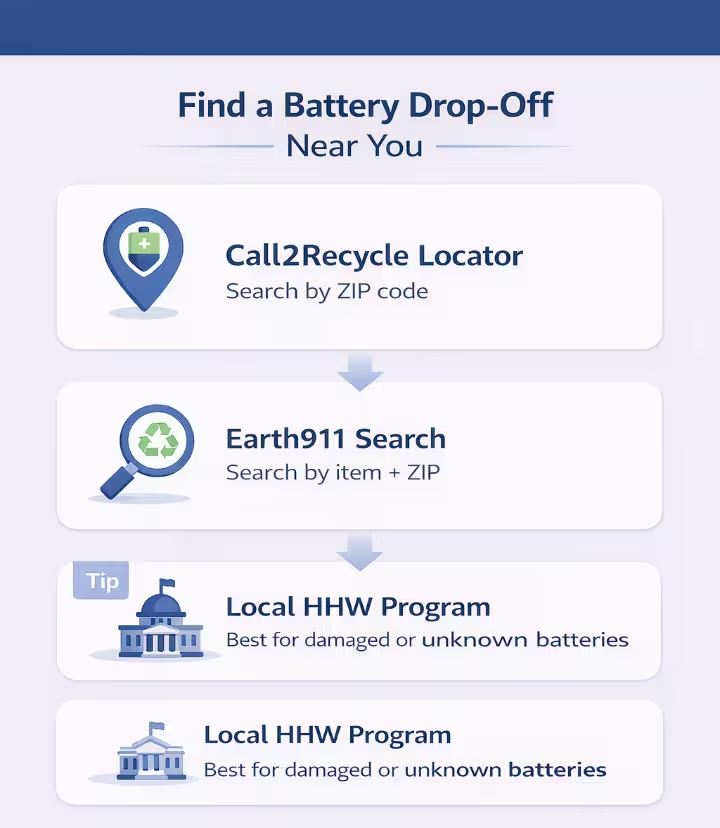
- Battery Network (Call2Recycle) Locator
- Earth911 Recycling Search
- Your local HHW program page (best for damaged/swollen batteries)
IN ORANGE COUNTY?
If you’re in Orange County and doing a cleanout, we can haul the junk fast and help you keep hazardous items separated (paint, chemicals, batteries, bulbs) so the cleanup stays simple and safe.
Want a quick ballpark? Text us 3–5 photos and your city to (657) 776-2336 and we’ll reply with a ballpark range and the next available window.
Or use our online cost calculator below for a fast estimate.
Takes less than 2 minutes • No name, email, or credit card required
Sources (Official Guidance)
- EPA: Used Lithium-Ion Batteries (recycling + safety)
- EPA: Used Household Batteries (alkaline, 9V, tape guidance)
- EPA: Lithium-Ion Battery Report Update (PDF)
- PHMSA: Lithium battery safety + damaged/defective/recalls
- CPSC: Battery safety (includes coin/button battery hazards)
- Poison Control: Button battery guidance
- Call2Recycle: Battery drop-off locator
- Earth911: Recycling search