

TV Mounting in Orange County: The No-Guesswork 2026 Playbook (DIY vs Pro, Fireplace, Hidden Wires + Same-Day)
Last Updated: March 1 , 2026
TV mounting sounds like a simple Saturday project… until you’re staring at:
- a wall plate that’s “level-ish” but the TV is crooked
- studs that don’t line up with where you want the TV centered
- a condo wall that’s metal-studded (and flexing)
- a fireplace install that looks good but feels terrible to watch
- wires you wanted hidden… and now you’re tempted to do something sketchy
This guide is for anyone searching TV mounting — whether you’re doing it yourself or hiring it out. You’ll get clear options first, and near the end I’ll show you the clean, fast way we handle installs across Orange County.
The 10-Second Reality Check
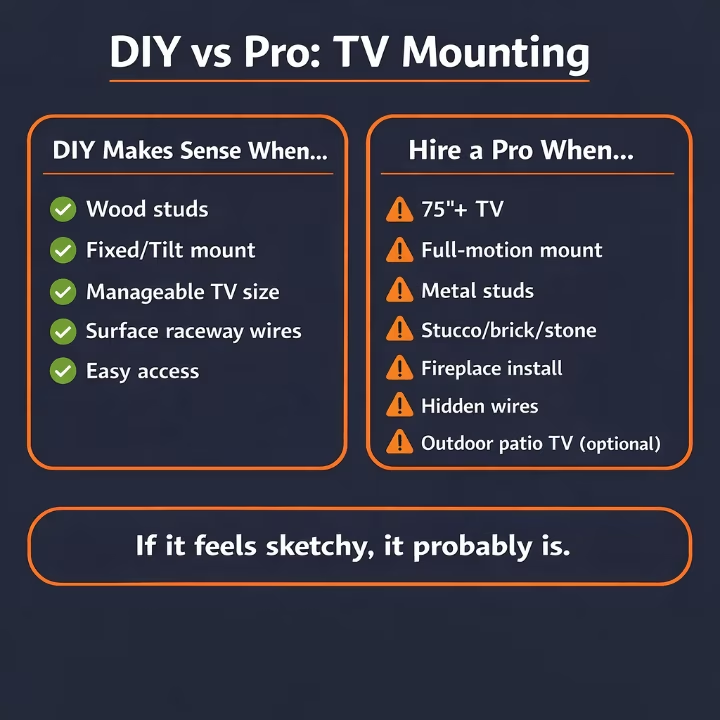
If any of these are true, DIY stops being “cheap” fast:
- your TV is 75″+ or feels awkward to lift
- you want a full-motion mount
- you live in a condo/apartment and suspect metal studs
- you’re mounting above a fireplace
- the wall is stucco / brick / stone / concrete
- you want hidden wires (not just “dangling”)
You can still DIY some of these — but the margin for error is small.
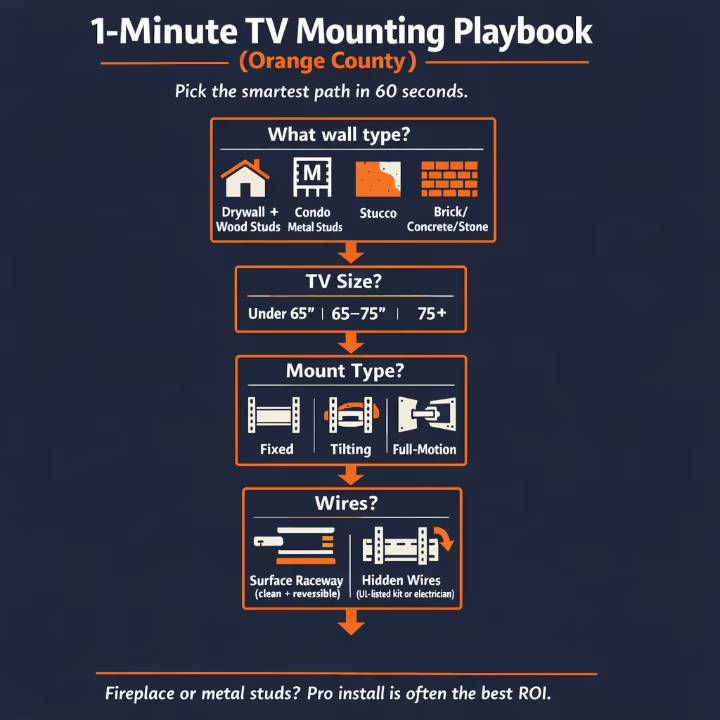
The 60-Second TV Mounting Chooser (Use This Before You Buy Anything)
DIY is usually a good move if:
- drywall + wood studs
- fixed or tilting mount
- TV is manageable (you can safely lift it with one helper)
- you’re fine with surface wire concealment (raceway)
- easy access (no tight corners, no fragile tile/stone wall)
Hiring a pro is usually the best ROI if:
- fireplace install (height + heat + anchors)
- condo metal studs
- stucco/brick/stone/concrete
- 75″+ TV or “two-person lift” territory
- full-motion mount (leverage is real)
- you want wires hidden cleanly without guessing
If you’d rather have it handled clean and fast, see our TV Mounting in Orange County service options.
A simple rule: if you don’t want to lift the TV onto the wall twice, don’t DIY the hard cases.
Quick Tool + Parts List (Screenshot This)
Must-haves
- stud finder
- level (24″ is ideal)
- drill + bits (wood bits + masonry bits if needed)
- socket wrench or drill socket attachment
- painter’s tape + pencil
- a helper (seriously)
Highly recommended
- wire raceway kit (cleanest “no drama” wire hiding)
- HDMI right-angle adapters (when ports get blocked)
- soundbar bracket (if you’re mounting audio under the TV)
- microfiber cloth + small vacuum (drywall dust happens)
What to Look for When Buying a TV Mount (5-Point Checklist)
Before you click “add to cart,” check these:
- VESA compatibility (matches your TV’s bolt pattern)
- Weight rating (comfortably above your TV’s weight)
- Stud spacing compatibility (the wall plate can hit studs where you need it)
- Mount type fits your room (fixed vs tilt vs full-motion)
- Hardware quality (solid wall plate, good lag bolts, locking mechanism)
If you’re mounting a big TV on a full-motion arm, don’t cheap out. That’s the highest leverage setup.
Step 1: Pick the Right Mount (Fixed vs Tilt vs Full-Motion)
Most people buy based on price or “fits 32–80 inches” marketing. Pick based on how you actually live.
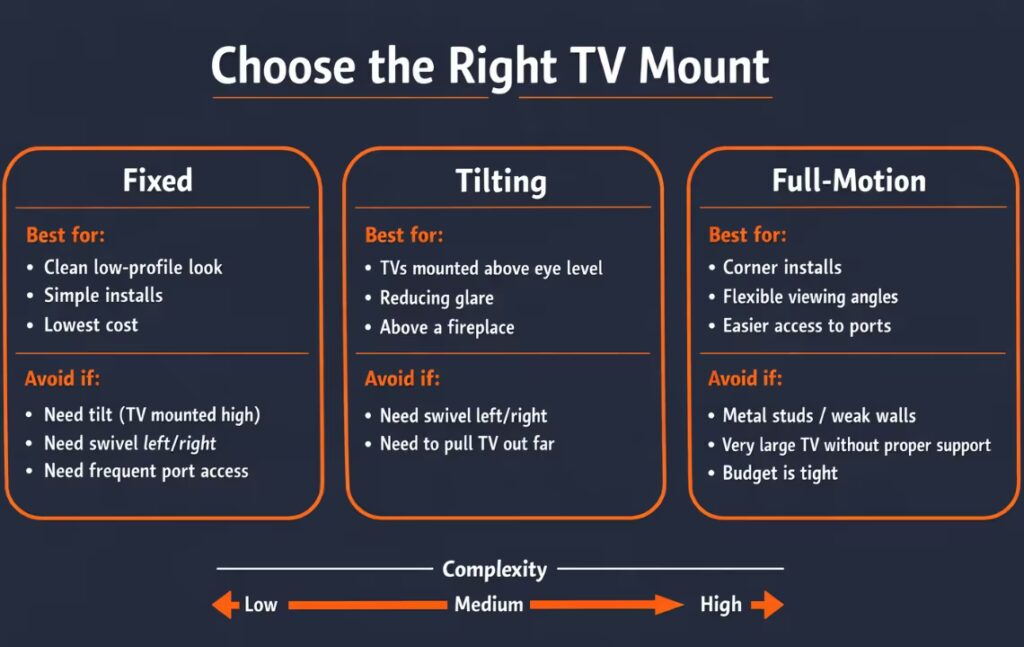
Fixed mount (lowest profile)
Best for: clean “picture frame” look, simple installs, most living rooms.
Avoid if: you constantly plug/unplug devices, or your outlets/ports are hard to reach.
Tilting mount (small angle adjustment)
Best for: slightly higher installs, glare control, some fireplace setups.
Avoid if: the TV is going way above eye level and you’re hoping tilt will “fix it.” It won’t.
Full-motion mount (articulating/arm)
Best for: corners, open layouts, bedrooms where you watch from multiple angles, kitchens.
Avoid if: your wall structure is questionable (metal studs, old plaster, uneven surfaces) or you’re mounting a huge TV without serious backing.
Real talk: full-motion mounts add leverage. Leverage is what pulls bad installs out of walls.
Step 2: Make Sure the TV Mount Actually Fits Your TV (VESA + Weight)
Ignore the “TV size range” until you check two things:
1) VESA pattern
That’s the bolt-hole spacing on the back of your TV (example: 200×200, 400×400, 600×400).
If the mount doesn’t list your VESA pattern, it’s not the right mount.
2) Weight rating
Your TV must be under the mount’s max weight.
If it’s full-motion + big TV, don’t buy the cheapest mount you can find and expect it to feel solid.
Common mistake: using bolts that are too long. Always use the correct bolt size/length from your TV + mount hardware pack.
Step 3: Height That Doesn’t Wreck Your Neck
“Looks good above the console” isn’t a height strategy.
A good baseline
For a typical couch setup, start with the center of the TV around ~42 inches from the floor, then adjust to your room.
If you want a quick sanity check before you drill, use the SANUS Height Finder to dial in a comfortable height for your room.
The better method (takes 60 seconds)
- Sit where you actually watch TV
- Measure from the floor to your eye level
- Aim to place the center of the screen close to that line (or slightly above)
A simple “formula” that works
- Screen center height ≈ seated eye height (usually within a few inches)
- If you’re mounting higher (fireplace, bedroom), you’re trading comfort for placement — so use tilt or a pull-down mount when needed.
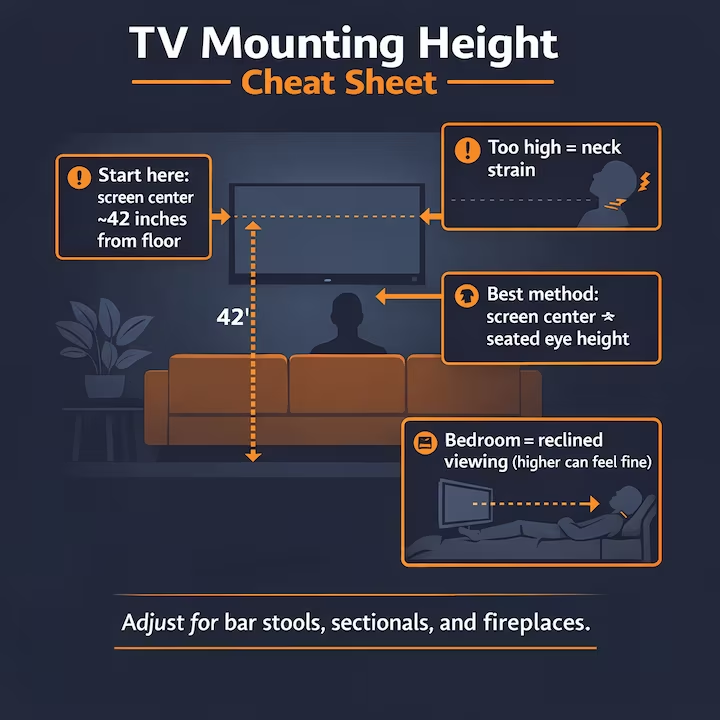
Bedroom note (people get this wrong)
In bedrooms, you’re often reclined — so the ideal height can be higher than living-room height without feeling uncomfortable.
Internal link placeholder: If you want the exact numbers room-by-room, see our TV Mounting Height Guide (coming soon).
Step 4: Orange County Wall Types That Change Everything
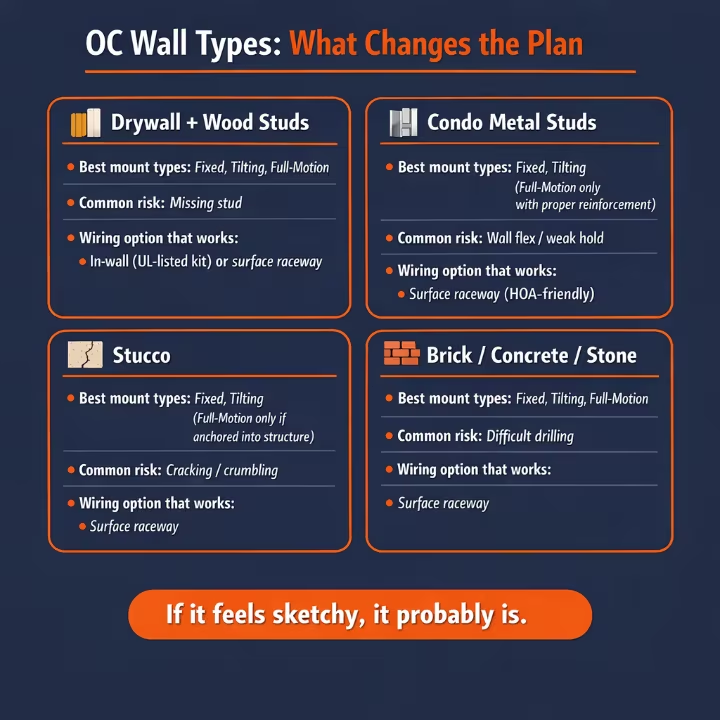
OC homes aren’t all the same. A lot of installs here involve:
- stucco exteriors and solid exterior walls
- condos with metal studs
- fireplace focal walls (often tile/stone veneer)
- tight parking / shared walls / HOA restrictions
We mount TVs across Irvine, Anaheim, Huntington Beach, Costa Mesa, Newport Beach, Mission Viejo, and everywhere in between — and wall type is the #1 thing that changes the plan.
Drywall + wood studs (most DIY-friendly)
This is the standard. If you hit studs and use proper lag bolts, you’re usually good.
Condo walls (often metal studs)
This is where “basic DIY” turns into “I hope this holds.”
Metal studs don’t behave like wood studs, and the wrong mount/hardware combo can twist or flex the wall — especially with full-motion mounts.
Condo/HOA reality: many buildings restrict cutting into walls or running anything in-wall. In those cases, surface raceway is usually the cleanest, least controversial option.
If you’re in a condo and want full-motion, your smart options are:
- switch to fixed/tilt, or
- hire someone who installs on metal studs correctly
Stucco, brick, stone, concrete
Stucco by itself isn’t structural. Brick/stone/concrete needs the right bit + anchors + technique.
If you crack a wall or blow out material, the repair is worse than the mounting job. This is one of the clearest “hire it out” cases.
The #1 “Center It” Problem: Studs Don’t Line Up
This is the reason DIY installs go sideways.
You want the TV centered over the console. The studs aren’t centered where you want them.
What not to do
- Don’t “just use drywall anchors” for a large TV.
- Don’t send random screws into drywall hoping it grabs something.
Smarter solutions
- Choose a mount with a wider wall plate so you can hit two studs even if they’re off-center
- Use a fixed/tilt mount if the wall can’t safely take full-motion leverage
- Plan the TV position around the studs before cutting holes or moving outlets
If you’re committed to a perfect centerline + full-motion + big TV, that’s usually the moment hiring help saves you from patching drywall.
Wiring: The Clean Look Without Doing Anything Sketchy
People love “hidden wires.” People also do dumb things to achieve it.
Don’t do this
Don’t run a TV power cord or extension cord inside a wall.
If you want the safety version in plain English, ESFI’s extension cord safety guidance covers why cords shouldn’t be run through walls.
Clean-look options that actually work
- Surface raceway (fast, clean, reversible, HOA-friendly)
- UL-listed in-wall power kit (clean look without guessing)
- Electrician installs a recessed outlet behind the TV (best finish)
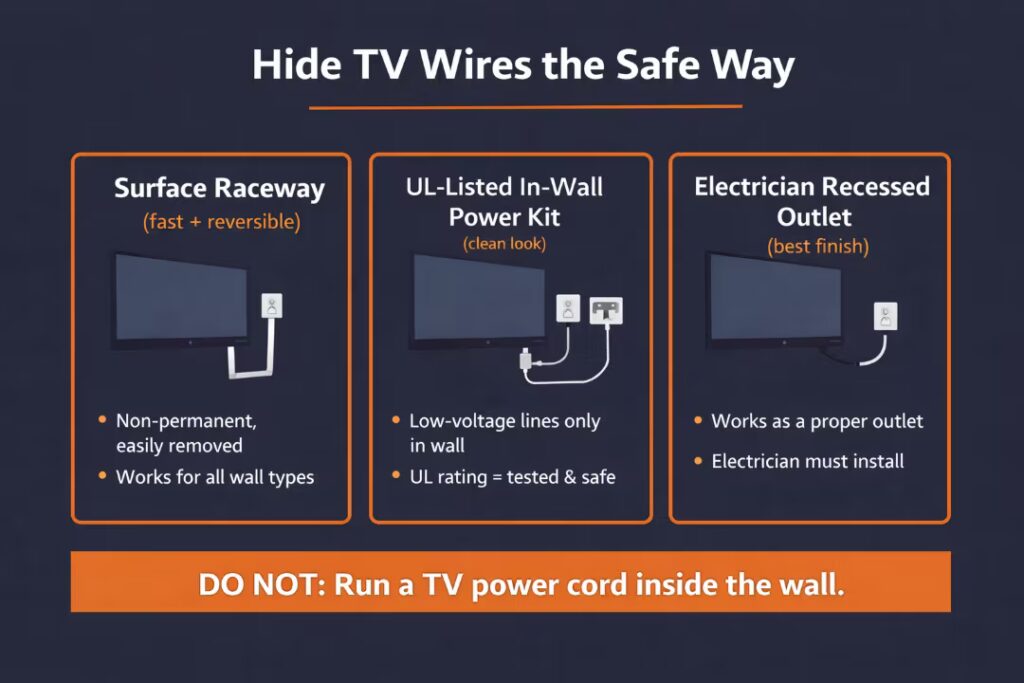
If you’re in a condo with rules or you rent, surface raceway is often the cleanest “no drama” option.
Outdoor / Patio TV Mounting (OC Bonus Section)
Outdoor installs are common in Orange County — patios, backyards, and covered balconies — but they’re not the same as indoor mounting.
If you’re mounting outside, plan for:
- over and sun exposure (glare + heat is real)
- corrosion-resistant hardware (outdoor-rated is worth it)
- wind + vibration (full-motion arms can bounce)
- power/weather protection (GFCI, weather-rated covers)
- the right TV (outdoor-rated TVs are different than indoor TVs)
If your “outdoor wall” is stucco or masonry, that’s also a higher-risk mounting surface. This is one of the most common “hire it out” situations.
Soundbar + Port Planning (The Detail Most People Forget)
A lot of installs look perfect… until you try to connect stuff.
Before you drill anything, decide:
- Are you mounting a soundbar under the TV?
- Do you need access to side-facing HDMI ports?
- Are you using Apple TV / Roku / game console?
- Will the TV sit close enough that angled HDMI adapters are needed?
Pro move: plug in your HDMI/power once before final tightening, confirm clearance, then lock it in.
DIY TV Mounting Walkthrough (The “Don’t Screw This Up” Version)
If you’re going to DIY, do it in a clean sequence.
The steps that matter
1) Find studs and mark your height
Use tape on the wall, mark centerline, and confirm stud locations.
2) Confirm the mount will hit studs
Hold the wall plate up and verify you can hit at least two studs.
3) Drill pilot holes into studs
Pilot holes help guide lag bolts and reduce splitting.
4) Lag bolts: snug, not insane
Over-tightening can strip studs or crush drywall.
5) Level check, then shake test
If the wall plate moves, you’re not done.
6) Hang the TV with a helper and lock it in
Engage the mount locks/screws so it can’t lift off.
Fireplace TV Mounting in OC (Height + Heat + Comfort)
Fireplace installs are popular in Orange County — and they’re where the most regret happens.
The three fireplace problems
- Too high → neck strain
- Heat → electronics stress
- Wall materials (tile/stone veneer) → tricky anchoring
The “no-guesswork” way to decide
- Run the fireplace for a bit
- Measure the wall area where the TV would sit using a simple thermometer
- If that zone runs hot, consider:
- a pull-down mount
- a different wall
- changing the plan (because heat + high placement is a rough combo)
If you’re set on a fireplace install, that’s where planning beats brute force.
Internal link placeholder: If you’re mounting above a fireplace, see our Fireplace TV Mounting Guide (coming soon).
Earthquake + Tip-Over Safety (SoCal Reality)
Orange County is earthquake country. A TV mount isn’t décor — it’s a safety device.
For simple tip-over prevention that applies to TVs specifically, see Earthquake Country Alliance’s TV safety guide .
Simple safety wins:
- use a mount with a real weight rating
- anchor to actual structure (not just drywall)
- for full-motion mounts, keep the arm retracted/locked when not needed
- if you have kids/pets, don’t leave the TV floating loose or poorly anchored
Real Scenarios (So You Choose the Right Option)
Scenario A: 55–65″ on drywall + wood studs, fixed mount, raceway wires
DIY is realistic if you have a helper and basic tools.
Scenario B: 75–85″ full-motion mount in a condo
This is where DIY “savings” disappear if the wall flexes, studs are metal, or you miss structure. Hiring is usually smarter.
Scenario C: Fireplace mounting with a soundbar + hidden wires
Fireplace installs combine the hardest factors (height, heat, materials, wiring). Pro install is usually the best ROI.
Scenario D: Stucco/brick/stone wall (or tile feature wall)
This is where the wrong drill/anchors can cause damage. If you’re not comfortable here, don’t learn on your own wall.
Scenario E: Outdoor patio TV on stucco/masonry
Outdoor adds weather + heat + hardware concerns. If you want it to last and look clean, pro install is usually smarter.
What TV Mounting Costs in OC (What Actually Drives Price)
Instead of guessing price off a phone call, pricing usually comes down to:
- TV size + weight (bigger TVs take more time and risk)
- mount type (full-motion costs more to install correctly)
- wall type (wood studs vs metal studs vs masonry)
- wire concealment (raceway vs in-wall power solutions)
- fireplace installs (height + materials + comfort planning)
- access (tight condos, stairs, parking, gated communities)
- outdoor installs (surface + hardware + weather protection)
Want a ballpark fast? Get an instant quote using our Handyman Cost Calculator.
Same-Day TV Mounting in Orange County (What to Send for a Fast Quote)
Same-day is often doable — these things slow it down:
- 75″+ TVs that need two people
- condos with elevator rules / reserved time windows
- fireplace installs with tricky materials
- in-wall wiring requests without a plan
- furniture not moved / no space to work safely
- outdoor installs (power/access/weather considerations)
Fast Quote Photo Checklist (Send This)
- Wide shot of the wall (include floor + ceiling if possible)
- Close-up of the wall material (drywall, stucco, brick, tile, etc.)
- TV photo (brand/model if you can, or just size)
- Outlet area (where power currently is)
- Access photo (stairs, hallway, condo elevator, gate, parking spot)
If you want same-day, text:
- 3–5 photos (use the checklist above)
- your OC city (Irvine, Anaheim, Huntington Beach, Costa Mesa, Newport, etc.)
- TV size (65/75/85)
- mount type (fixed/tilt/full-motion)
- wire goal (raceway vs hidden)
- any condo/HOA access notes
Quick FAQs
About OC Bros
We’re a licensed and insured local team serving all of Orange County. We help homeowners, renters, landlords, and businesses get clean, safe installs that actually look right, from standard TV mounts to fireplace setups, soundbar mounting, and wire concealment.
You’ll get flat-rate pricing, clear timelines, and no surprises.
Next Step
- Want to DIY? Use the playbook above, pick the right mount for your wall type, and don’t skip the stud + wiring rules. It’ll save you from patching holes twice.
- Want it handled clean and fast? Text a few photos and your city to (657) 776-2336 for a flat-rate estimate and a clear game plan.
Send this for the fastest quote:
- wide shot of the wall
- close-up of the wall material (drywall, stucco, brick, tile, etc.)
- TV size (65/75/85) + mount type (fixed/tilt/full-motion)
- outlet location + whether you want wires hidden or raceway
- any condo/HOA access notes (elevator, parking, rules)
We also handle junk removal, furniture assembly, moving, estate sale pickup & delivery, and installs across Orange County.
Ready to lock in your TV mounting plan?
Skip the crooked installs, wall damage, and last-minute surprises. Text a photo of your wall and TV size to (657) 776-2336 and we’ll help you choose the fastest, safest option, whether that’s standard mounting, fireplace mounting, soundbar mounting, wire concealment, or an outdoor patio setup anywhere in Orange County.
Licensed, insured, and locally trusted. Click the link below for an instant quote using our Handyman Cost Calculator.
Takes less than 2 minutes • No name, email, or credit card required